This page documents how volunteers consent to receive scheduling text messages from Planning Orchestrator on behalf of their church. It exists so that mobile carriers, The Campaign Registry (TCR), and Twilio can verify the consent flow even though the administrator-facing portion happens behind a Planning Center OAuth login.
This is a transactional SMS program for church volunteer scheduling. It is not used for marketing or promotional messages.
This is the primary opt-in flow. A church administrator adds a volunteer's number after attesting they have the volunteer's permission, and the volunteer must reply YES to a confirmation text before any further SMS is sent.
Before the volunteer's number is entered into Planning Orchestrator, the church obtains permission directly from the volunteer through one of:
In-person conversation when the volunteer joins a serving team
Written volunteer intake / serving team signup form
Existing church communication policy the volunteer has agreed to
Planning Orchestrator never collects the volunteer's number directly — it is always entered by the church administrator who already has a relationship with the volunteer.
Step 2 — Administrator enters the number with required attestation
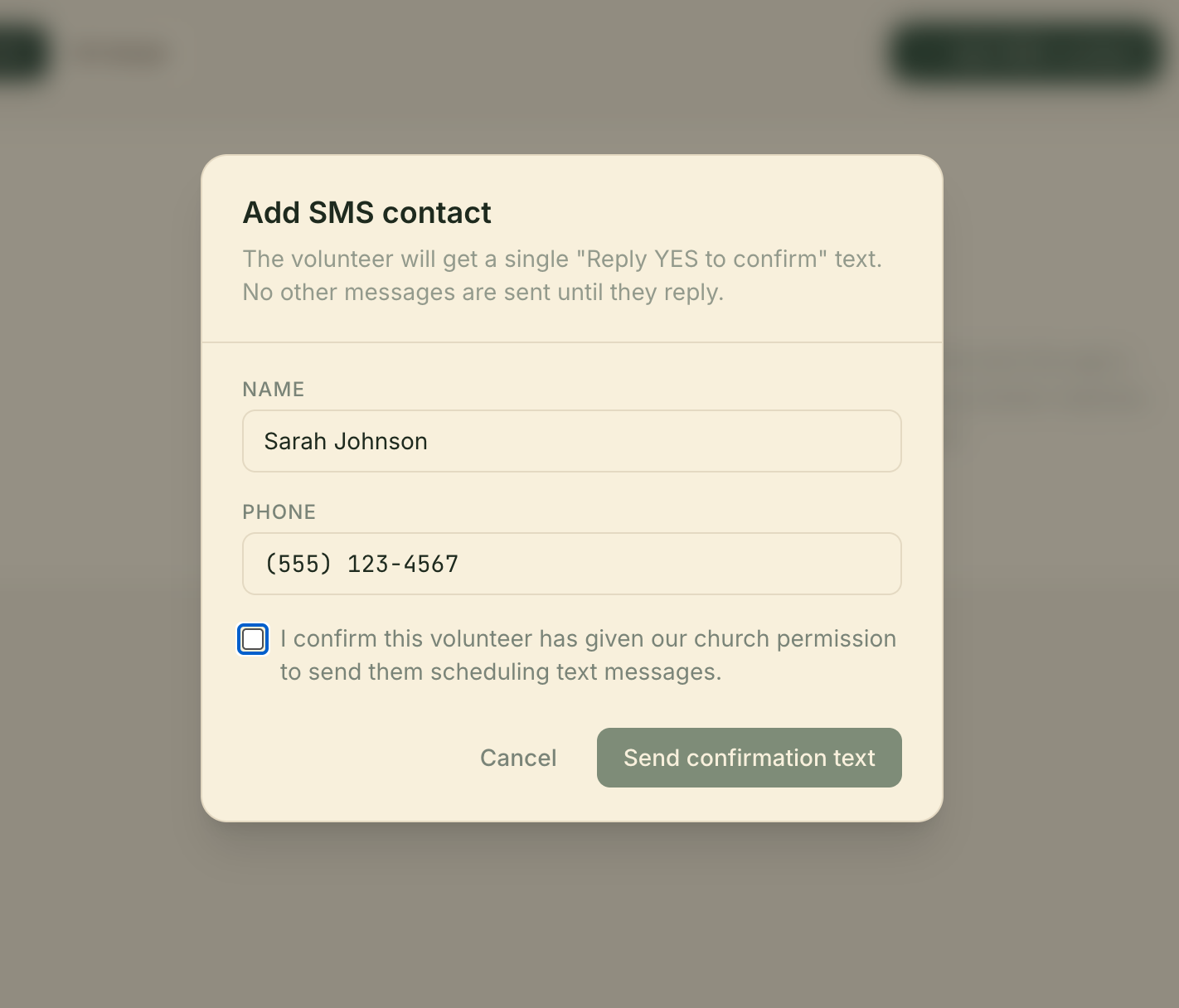
The administrator opens the “Add SMS contact” form in the Planning Orchestrator dashboard at /dashboard/contacts. The form cannot be submitted unless the administrator checks an attestation checkbox confirming that the volunteer has given the church permission to be contacted by text for scheduling.
Planning Orchestrator dashboard — Add SMS contact form. The “I confirm this volunteer has given our church permission” checkbox is required before the form will submit.
Step 3 — Volunteer receives a single confirmation SMS
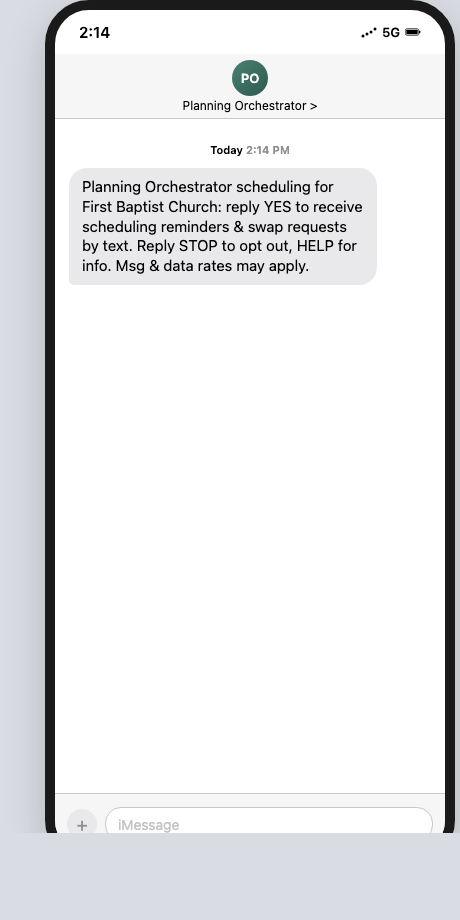
Upon submission, Planning Orchestrator sends exactly one confirmation message to the volunteer. The message identifies the program, names the church, includes STOP and HELP keywords, and includes the carrier-rate disclosure. No further SMS is sent unless the volunteer replies YES.
Planning Orchestrator scheduling for [Church Name]: reply YES to receive scheduling reminders & swap requests by text. Reply STOP to opt out, HELP for info. Msg & data rates may apply.
The confirmation SMS as received on a volunteer's phone.
Step 4 — Volunteer replies YES (or never receives further messages)
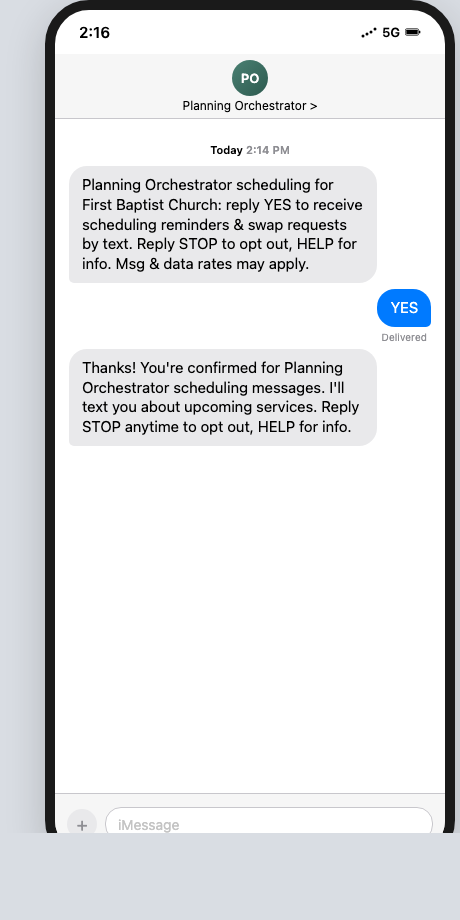
The volunteer must reply YES to grant consent. Internal consent state moves from requested to granted only on a YES reply. Any other reply (or no reply) leaves the volunteer in requested state and no further SMS is sent.
Volunteer YES reply confirming opt-in. Replies of STOP, no reply, or any other text do not grant consent and no further messages are sent.
Consent Path 2 — Volunteer-initiated
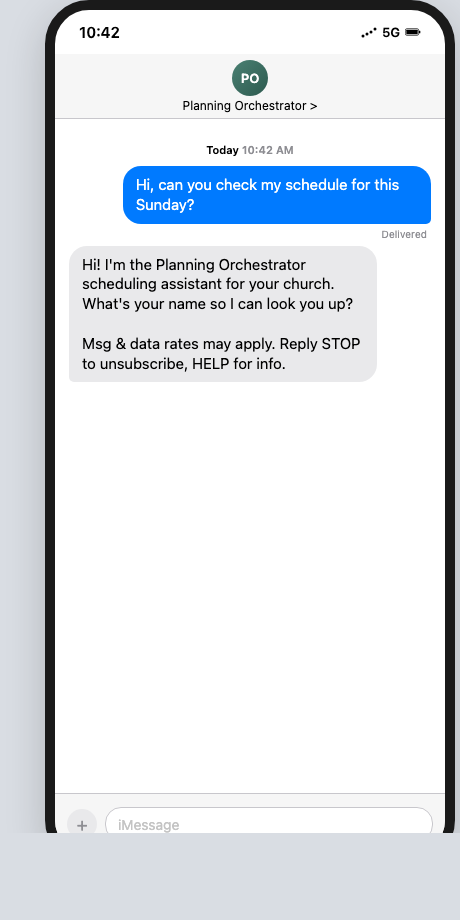
If a volunteer texts the church's Planning Orchestrator number first — for example to ask about their schedule or decline a service — that initiating contact is itself consent to receive scheduling-related SMS replies. The first reply we send always includes the program disclosure (message/data rates, STOP, HELP) before any further messages.
Volunteer-initiated path. The volunteer's first inbound message constitutes consent; our first reply includes the program disclosure.
Opt-Out
Volunteers can opt out at any time by replying STOP (or UNSUBSCRIBE, CANCEL, END, QUIT, STOPALL) to any message. Opt-outs are honored immediately and indefinitely. Replying HELP or INFO returns a short program description and support contact.
Sample Messages
Scheduling reminder: “Planning Orchestrator: Hi [Name]! Quick reminder — can you confirm [Position] for [Date]? Reply Y to confirm. Reply STOP to unsubscribe.”
Swap request: “[Requester] is looking for someone to swap [Position] on [Date]. You'd take [Date] and [Requester] takes your [OtherDate]. Reply YES if interested. Reply STOP to unsubscribe.”
Swap confirmation: “Your swap is confirmed! [Partner] takes [Position] on [Date1], and you'll take [Position] on [Date2].”